> ## Documentation Index
> Fetch the complete documentation index at: https://developer.onecodex.com/llms.txt
> Use this file to discover all available pages before exploring further.
# The Tag Resource
In addition to support for structured metadata via the Metadata resource, the One Codex platform supports attaching arbitrary labels or tags to samples. These tags are displayed in the Samples view of the One Codex web application.
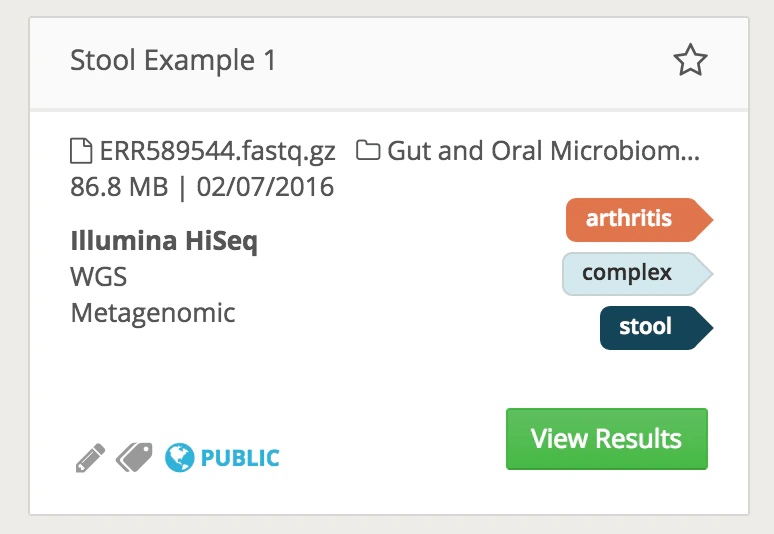 Users can create and apply arbitrary tags to their samples, and then use those to query for or filter to a subset of samples. The One Codex platform also automatically applies tags that reflect underlying annotations we are able to generate from your microbial NGS data. Tags on a sample may be updated by PATCHing an updated listed of tags to update a sample record (see [Updating Samples](/api-reference/sample-resource-patch)).
For example, if you upload a FASTQ file from an *E. coli* isolate, you should see the system automatically tag is as *E. coli*, tag it as an "isolate", and then automatically run and tag the sample with its [MLST type](https://en.wikipedia.org/wiki/Multilocus_sequence_typing).
Users can create and apply arbitrary tags to their samples, and then use those to query for or filter to a subset of samples. The One Codex platform also automatically applies tags that reflect underlying annotations we are able to generate from your microbial NGS data. Tags on a sample may be updated by PATCHing an updated listed of tags to update a sample record (see [Updating Samples](/api-reference/sample-resource-patch)).
For example, if you upload a FASTQ file from an *E. coli* isolate, you should see the system automatically tag is as *E. coli*, tag it as an "isolate", and then automatically run and tag the sample with its [MLST type](https://en.wikipedia.org/wiki/Multilocus_sequence_typing).
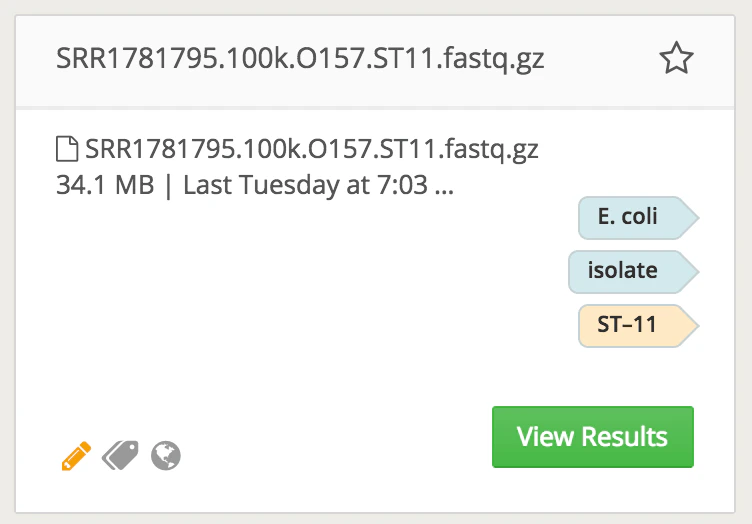 By convention, tags created automatically by our system have lighter colors and dark text. User-created tags have bolder colors with white text.